Development of Elysian | 2025 May - 2026 July
This post is about a comprehensive overview of everything that we have been working on for Elysian since the original shutdown in May 2025. It also contains statistics and others regarding the affects of the overall development and how the idea of Elysian was shaped overtime.
Elysian Development Walkthrough by Nyseus
Please understand, there are feature spoilers in this page. Only read if you are fine with that.
2025 January - May
The Original Elysian was much simpler and more basic compared to the idea of it today. This exposed several flaws in the core server vision and design that I (Nyseus) promised to fix based on player base feedback.
Some of these Polls, can still be found in the polls channel on our Discord server, starting at: https://discord.com/channels/1277714476635783258/1283544508465811556/1367218847517642762
During these times, I also introduced the idea of a Custom world, with fully custom features like WorldEvents. The feedback to these was overwhelmingly positive.
At Elysian, we decided to pick the latter to work on a World that is truly fit for the descriptions that we want, with all the elements that we originally planned properly implemented. All to provide an unforgettable experience for the players.
WorldEvents was a concept that I had planned for a long time. By default, it’s a custom server-side and client-side mod that adds fully custom elements to the world that rely on certain events. I originally intended to collect already made mods that would serve the same purpose; however, many didn’t exist, some were not compatible, or were low quality. This realistically only left the option of making it from scratch.
2025 June - September
At the beginning of June, I realized that alone I am not able to develop the features that I had originally planned, nor can I properly take care of the server alone. As a result, I announced an admin recruitment program to get some help.
Out of the 7 total applications, James, s1ice, and Gabry were accepted as Admins. Most of the other applicants had insufficient experience, meaning they couldn’t really provide any help with the server or with its development. Despite this, some of those applicants were accepted into Moderator and Helper positions.
For XXX$ USD, which was financed out of my own pocket, a professional mapmaker was hired to work on the project, and he accepted and promised delivery within a month.
In the meantime, some other Staff members began working on other basic server work. Such as the complete reset of the server, the fixing / renewing of Server configuration. I also started expansion work on the Performance tool I had released in the previous Season, called “Performance BETA” (PerfB).
PerfB was a script-based (Skript) tool that automatically regulated server settings based on live load and executed entire server restarts. I made this script by hand using the Skript Spigot plugin. It was an extremely simple, yet surprisingly effective for what it was worth:
# Periodic TPS warning every 15 minutes if TPS is lowevery 15 minutes:set {_tps_raw} to placeholder "server_tps_1"set {_tps} to {_tps_raw} parsed as numberif {_tps} < 13:broadcast "§e[§6Performance BETA§e] §fServer is experiencing some server lag. §7This is normal at higher player counts. §fTo help minimize your impact on the server, avoid travelling fast or doing lag-intensive activities."every 1 minute:# Get TPS and Memoryset {_tps_raw} to placeholder "server_tps_1"set {_tps} to {_tps_raw} parsed as numberset {_freeMB} to free memoryset {_maxMB} to max memoryset {_freePct} to ({_freeMB} / {_maxMB}) * 100# TPS Lag Handlingif {_tps} < 15:if {performance.adjust.enabled} is true:set {performance.lag.detected} to trueexecute console command "schedule clear incendium:clocks/main"execute console command "schedule clear incendium:clocks/1m"execute console command "schedule clear incendium:clocks/1s"execute console command "schedule clear incendium:clocks/2t"execute console command "schedule clear incendium:clocks/7s"# Incendium Clocks consume a lot of power, and are not used oftenexecute console command "dynview setsimulationdistance 1"execute console command "dynview setviewdistance 1"# Chunkload singlehandely contributes over half of all pressureexecute console command "bluemap stop"# Bluemap has very pressure heavy chunk scanning# Periodic entity cleanup (every 5 minutes)if {performance.cleanup.enabled} is true:add 1 to {performance.cleanup.ticks}if {performance.cleanup.ticks} = 5:broadcast "§e[§6Performance BETA§e] §fRunning entity cleanup commands..."if {performance.cleanup.ticks} >= 5:execute console command "minecraft:kill @e[type=alexsmobs:cockroach]"execute console command "minecraft:kill @e[type=alexsmobs:fly]"execute console command "minecraft:kill @e[type=minecraft:marker]"# These entities are useless, but we cant control them. Monkey mode onexecute console command "lagg clear"# Clear dropped entitiesset {performance.cleanup.ticks} to 0# Emergency RAM Check (OS-level)set {_ram_used} to placeholder "server_max_ram" parsed as numberset {_ram_max} to placeholder "server_ram_max" parsed as numberif {_ram_used} > 25450:if {performance.restart.enabled} is true:send action bar "§c[Performance BETA] Executing Emergency restart to avoid crash in 30 seconds!" to all playersplay sound "block.end_portal.spawn" at all playersexecute console command "save-all"wait 10 secondssend action bar "§c[Performance BETA] 20 seconds left until Restart." to all playersplay sound "block.note_block.pling" at all playerswait 10 secondssend action bar "§c[Performance BETA] 10 seconds left until Restart." to all playerswait 5 secondsplay sound "block.note_block.pling" at all playerssend action bar "§c[Performance BETA] 5 seconds left until Restart." to all playerswait 5 secondssend action bar "§c[Performance BETA] Restarting now." to all playersplay sound "block.note_block.pling" at all playerswait 1 secondexecute console command "restart"
This basic setup is relatively common amongst most modded servers, so this wasn’t some sort of revolutionary invention.
While designing this script, it was super important to figure out the exact lag causes. This meant pressure testing and running profilers and hoping to spot what stands out.
Example of a Spark Flamegraph that we use to identify lag problems:
In this particular example from November 2025, the source of the issue is that the Majrusz’s Library mod is performing heavy checks to spawn Cursed Armor chests, causing intense lag during chunk loading. We later fixed this particular issue by building a mod that injects into the culprit mod and throttles/limits these checks without killing its functionality.
Expanding further on this idea, we came up with the ability to arrest players who are knocked down. As sometimes people prefer to arrest someone rather than have them respawn. This, by itself, opens up a whole new layer of Roleplay. Allowing the arrested individual to be trialed and jailed.
This was the first custom mod we started to develop, but we were mainly still inexperienced and needed help; because of this, I hired yet another freelancer to help make this mod. For XXX$ USD, the developer offered to make this mod. After some trial and error, this mod was completed around November 2025.
Around this time, in August 2025. The first-ever problems started to show.
I gave this person 1-2 more weeks to have the map ready; however, they declined, explaining they won’t be able to do that. As a result, this order was cancelled, and I had to find another Freelancer to complete the work. This already pushed development away by 1-2 months.
Roughly in September, another Freelancer was hired who looked more capable. Promising delivery around October 2025.
Around this same time, I decided to move away from dedicated Minecraft hosting. Our development and performance orianted works were limited by such hosts who do not give root terminal access. I understand why; we just outgrew such limitations. As in the next phases of Performance orianted works, we needed to directly modify JVM flags, exact RAM allocation/diversification, and more.
We decided to fully rent a server with basically limitless access. This move today allows us to host more than just a Minecraft server. With this server, we host our own API, websites, and more. However, back then, it just meant more RAM and a better CPU for roughly the same price, with more possibilities in the future. After migrating the entire server to the new location and properly configuring it, we were back on track.
2025 October - December
October was the time when we realized we were alone and there was nobody able to help us anymore. The questions we were asking were new and hypothetical. Sometimes our concepts were so complex and difficult that experienced devs offered no help or advice.
The Freelancer I previously hired the month before also gave up on our Map project as simply too complex, with him underestimating the amount of work required. This was the last time we decided to hire a Freelancer, as we have realized they are too ambitious, yet unreliable.
Our savior in this issue ended up being James, whom I recruited a few months prior as an Admin. He offered to struggle through the complexities of the map and build it up from scratch, as he had some experience with the tools we use to make custom maps. Unlike the freelancers, James actually made progress on the map, and together we were navigating the issues that the idea of a modded map provided. Let's go through the issues
- WorldPainter is not really compatible with modded elements.
If we want to use brushes and other elements such as the modded trees, custom modded blocks in terrain, and other things like custom rivers and structures. It’s a whole shebang.
- Structures cannot be used with WorldPainter.
Simply based on how Minecraft works, structures are generated in a phase before the terrain is even made. Trying to reverse this process, aka placing the structures after the world is already done, is basically impossible.
- WorldPainter itself is an old and non-user-friendly software.
As a software made in 2011, its UI and some of its methods are unconventional and sometimes require repeated monotone actions. Absolutely no hate to the makers of WorldPainter; I don’t blame them; it’s a non-profit software maintained by 1 person.
- Most of us lack any artistic ability.
Not directly related to modding, but I personally have no artistic talent whatsoever; sl1ice and Gabry are largely in the same boat as me. This basically means that the part where someone has to draw the world by hand falls on 1 person. That one person being James.
While James was working on the map, I began looking back at the performance improvements. I have come to the conclusion that the expected server load cannot be sustained by a performance regulator as simple as PerfB. We needed something more advanced, something more dedicated, and powerful.
With this, I began theorizing on how to expand on performance. Elysian is a Hybrid Arclight server, which means it runs on Forge with an implementation for Bukkit/Spigot plugins to run on the same server. This is something that's normally not possible, and also relatively unpopular/underrated. This means whatever performance implementations we make have to be compatible not just with Forge but also with Spigot. This is already highly difficult and new.
I dived deep into server performance research, and came to the conclusion that experimental multithreading is the single most effective way to eliminate such issues, even if it’s unstable. Furthermore, I wanted to expand on the base features of PerfB, with more targeted, less vague, and less unreliable metrics, etc.
As a result of my research, I began working on Elysian’s custom performance mod, which I decided to call Haste.
Haste’s actual development lasted well into December 2025; to this day in July 2026, Haste is still being constantly worked on roughly on a daily basis to work out minor bugs and improve the mod itself.
Measuring server performance
public void onServerTickStart() {tickStartNanos = System.nanoTime();}public void onServerTickEnd() {long elapsed = System.nanoTime() - tickStartNanos;addSample(elapsed / 1_000_000.0d);updateSmoothedTps();}
Deciding which entities can be multithreaded
if (entity instanceof Projectile|| entity instanceof AbstractMinecart|| entity instanceof ServerPlayer|| isBlockedEntityClass(entity.getClass())|| synchronizedEntities.contains(entityTypeId)) {return true;}
Sending safe entities to the thread pool
if (shouldTickSynchronously(entity)) {return false;}CompletableFuture<Void> future = CompletableFuture.runAsync(() -> performAsyncEntityTick(world, entity),tickPool);taskQueue.add(future);return true;
Waiting for the work to finish safely
CompletableFuture<?> allTasks =CompletableFuture.allOf(futuresList.toArray(new CompletableFuture[0]));while (!allTasks.isDone()) {pumpMainThreadTasks(128);ServerCompat.pollTask(server);}
Handling Forge and Spigot compatibility
if (ParallelProcessor.shouldBridgeThreadAffinityCallbacks()) {return ParallelProcessor.callOnMainThread(() -> original.call(event, wrapper));}
Automatically reacting to server pressure
if (memHeadroom < 0.10d) {return PerformanceMode.VERY_HARD;}PerformanceMode desired = evaluateDesiredMode(smoothedTps, general);if (isTightening(desired, current)) {return desired;}
Today Haste is a server-side mod that contains:
- 154 production Java files
- 24,400 total Java source lines
- 21,380 non-empty Java lines
- 10 test files with 277 additional lines
- Approximately 1 MB of tracked source code
- A compiled mod size of 584,613 bytes, or roughly 571 KB
Using Haste, we were also able to properly calculate the perfect JVM flags for the server. We learned a lot, such as how Elysian is actually perfect for using Generational ZGC (uncommon among Minecraft servers) and that running the server requires way less RAM than we originally expected.
Around December 2025, WorldPainter and structures became one of the largest problems we were facing. I’d like to take you through how we tried solving this problem.
Attempt no. 1
Manually place the structures.
The mod itself is similar to Schematica or Create Schematics. We select a structure, position it like a schematic, and then place it via commands. A very Monkey solution to a super complex problem. In terms of functionality, it worked; however, we soon ran into the Problem that the map itself would be huge, and even with 4 staff members, it would take many hours of manual labour and trial and error to place them by hand. This precious time we didn’t have while working on several other projects. Regardless, as we saw no other solutions, we tried anyway, hoping that the damage was not too bad.
Generate the structures on existing terrain. Aka reverse-engineer Minecraft structure generation.
This was the original idea; however, realizing its sheer complexity made us try manually placing structures first. That’s how bad it is.
In theory, it’s relatively simple: scan the terrain for places where a structure can be placed; when an area like this is found, place the structure and slightly smooth the terrain. Of course, there are several “small” details that people don’t think about until they are actually making something.
In terms of issues, it’s hard to say where to begin. So I’ll just list them from most memorable to least memorable.
1. The mod needed to know what structures can be placed where. So, for example, we do not try to place an ocean temple in a plains biome above ground. This was fixed relatively simply with vanilla structures; with modded ones, not so much, as sometimes modded structures are not coded the same as vanilla ones, which basically means they do not provide simple information such as “can spawn in X biome,” “can spawn at X height,” “can spawn at X elevation”. This means for the vast majority of structures we had to manually verify where they can spawn and under what conditions.
2. Terrain smoothing was not nearly as easy as we originally expected. We tried different approaches, even getting as desperate as to code a direct implementation for the WorldEdit //smooth command. It worked. Kind of. It was easily the best way to make it work, and even then it has issues. Eventually James found a solution to the smoothing problem, and we could move on.
3. Villages are so much more complex than anyone could have expected. Nobody thinks about them; however, Mojang put so much complexity into their generation that no wonder most of the time they generate oddly. Like most structures, Villages are generated before the terrain in vanilla Minecraft. They are made up of multiple pieces that all connect. To put it simply, villages are divided into 2 parts: the houses and the roads. The roads depend on the terrain; the houses depend on the road and the terrain, and all together they depend on each other. Normally, without fixed terrain, in the generation process, the terrain just morphs and bends to the needs of the village; however, unfortunately, we do not have such luxury.
Attempt no. 3?
There wasn't really a third attempt. I'd call it Misc. rather.
We often go back and fourth between the manually placing strategy and the generator. Depending on how hard the doomerism goes. We often encounter issues regarding structures so often that one day it feels like you made a break through only for it to get shattered the next day.
The manual placing strategy is fix, it is guaranteed to work. However, who on Gods green Earth would like to do that? So we experiment as long as we have the time. As long as the Map itself isn't done we are not under pressure to invent a magic fix for structures. However, the latest builds seem to work as intended with the generator with only minor flaws.
2026 January - July
Polishing of the work.
In January 2026 James completed the first map version that was testable. Many of you might remember this time as the BETA testing. The timing was convenient, as I also finished some builds of Haste and other features.
During the BETA testing there were several issues that arose, this was also the point of the BETA testing. We knew the server wasn't done, we wanted to know what was wrong.
The testing revealed that Haste was still not ideal. It revealed that the Server doesn't feel immersive. It revealed that the map was too simple. 3 Separate issues, with severe underlying causes. Let's understand them.
Haste
More digging revealed a Heap issue which was visible after some time.
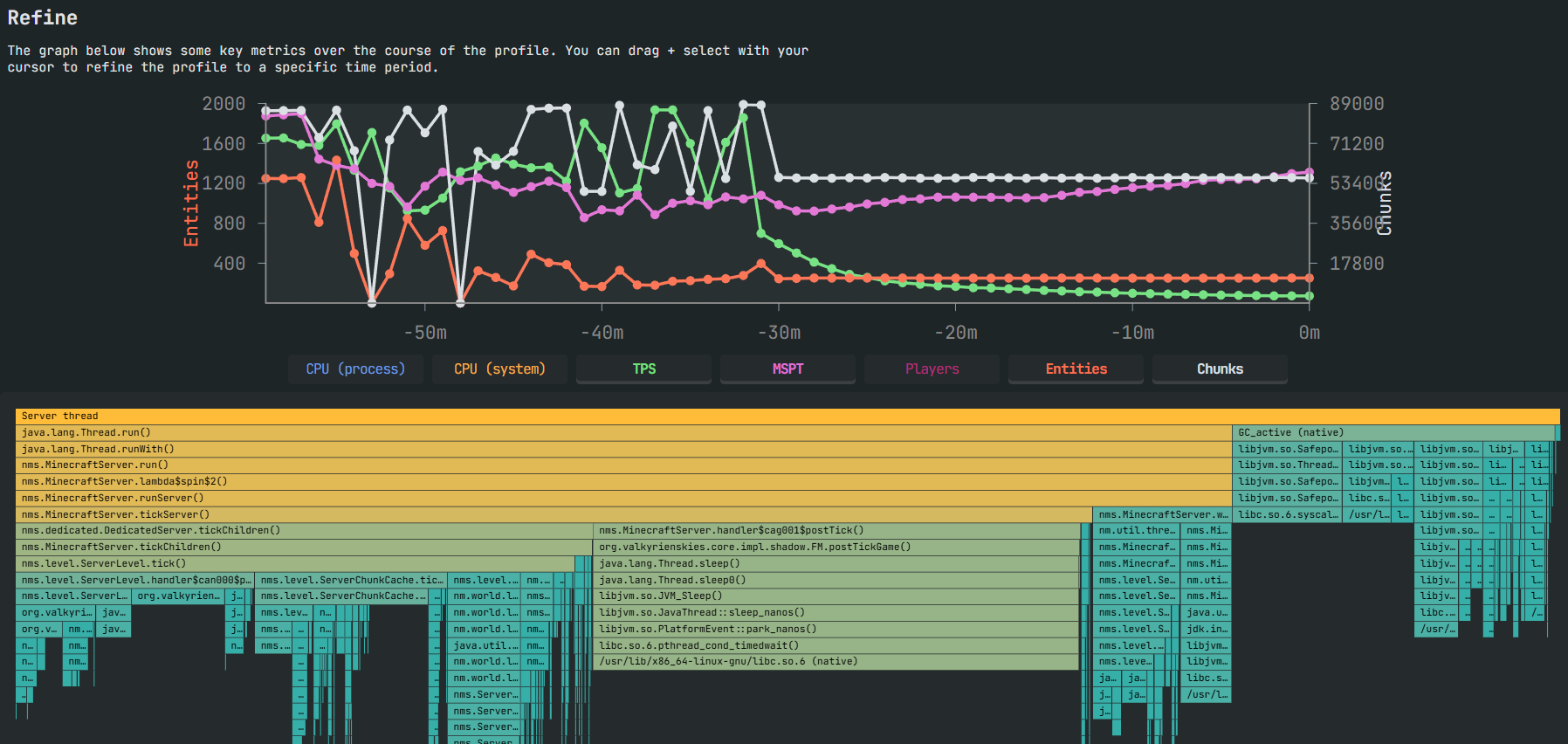
This is normally due to a memory leak. The reason was that Haste's cache kept collecting Asynchronous entities. This resulted in a build-up of cache memory, which eventually ran out. This isn't like normal out-of-memory errors. This one doesn't crash the server, it silently kills it and all activity on it. This can be seen on the Green TPS graph on the above picture.
Unfortunately, to diagnose this issue took weeks of trial and error.
Lack of Immersion
Watching the players on the server and being with them made me realize that while the server is built on realism it's missing one crucial aspect of it.
The ability to see far.
Due to Server performance, actual chunk render distance can get low to ensure the server stays playable. In very severe situations it can get as low as just 1 single chunk. However, in those cases it's only to free up memory for an emergency restart. The average actual render distance depends on the activity and concurrent server pressure. Without sufficient data I am unable to say an average render distance, but if I'd need to guess I'd say 2-3 chunks would be normal. However, that is nowhere near enough to properly see and immerse yourself in the game.
Around this time, mods like Distant Horizons and Voxy were starting to take off. However, with Elysian, it's never just a simple "add the mod to the modpack". Voxy for starters, is a fabric mod, we are on Forge. Distant Horizons is known to have performance issues. In our situation where we are already struggling to maintain client side performance that was an immediate no.
Other reason's for the lack of immersion was to the predictable nature of the Server. There are no sudden terrors or others that players would need to suspect. This time I remembered that I originally designed the concept of a mod called WorldEvents that does exactly that.
Furthermore, a seemingly random appearance in the world also seemed to disconnect everyone from the realistic focus of the world.
I began working on mods to enhance the QOL and overall feeling of the world.
Let's start with the first-join sequence.
On top of the First-join sequence, we have also made unique one-time ticket replicas.
These ticket replicas have a unique ID number which is visible in its render, each player gets their own number.
Furthermore, we have a tab for age achievements.
To solve the problem of render distance, after many failed attempts at quite literally recreating Voxy, we opted to just make a hook mod to make Voxy function on Forge. This is the result. Please keep in mind, that due to me recording my screen the FPS is lower than normal.
Voxy can go up to as many chunks as you like, it's limited by only your Computers specs. In the video, I have my Voxy view distance set to 80 chunks. These chunks are sent from the server directly to your client, so no download's needed. However, if your wifi is unstable, it is possible to locally store these Voxy chunks.
I have added custom modes that instead of relying on fixed settings automatically adjusts your chunk digestion rate and view distance based on your current FPS compared to a "goal FPS". So for example, if your FPS allows it your client isn't capped at 80 chunks and can keep going as long as your FPS is stable. This is also helpful when entering laggy areas, as when that occurs your chunk digestion effectively stops to allow your client to deal with the lag.
Our custom Voxy implementation also has dedicated modded block processing, something that Voxy by default, doesn't do. What this means in essence is default Voxy either doesn't render, or renders modded blocks incorrectly, this is a known limitation. Our Voxy on the other hand has been improved to allow some of the modded blocks to be rendered correctly. For example: Domum Ornamentum, Framed Blocks, Dynamic Trees.
Bonus:
I am currently working on an addon that would allow people to edit a global map using Xaero's World Map. Nation Leaders would be able to draw their borders, roads, among others. This would show as a map layer that players can toggle as they like. Everyone gets this map and it gets globally synced. Since this mod is only in the early stages of development I am unable to show any screenshots.
The Map's simplicity
Playing on the map didn't feel special or unique. Unless you were told it's a custom map, you would never realize that it is. Large seemingly endless biomes made it feel monotone and the overall lack of detail made the individual biomes feel empty.
The map being finished was a major milestone. However, in it's current state, it didn't live up to the expectations.
Unfortunately, due to this I had to ask James to resume work on the Map and to make it more immersive. He agreed and started on the refining process.
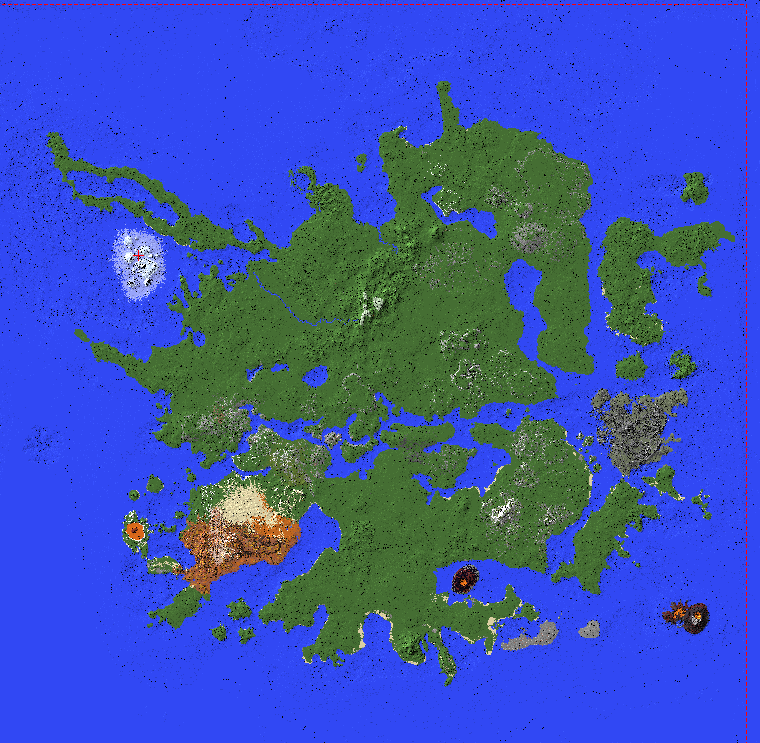
The above picture is of the old map, before it's revision.
James overall has done a great job at the map. He is currently working on the Map which is nearing it's final polishing touches. The map is our final main blocker to release.
The Launcher
We created the launcher as a side project over the course of about 3 months. Mainly I worked on the launcher, but recently it was completed.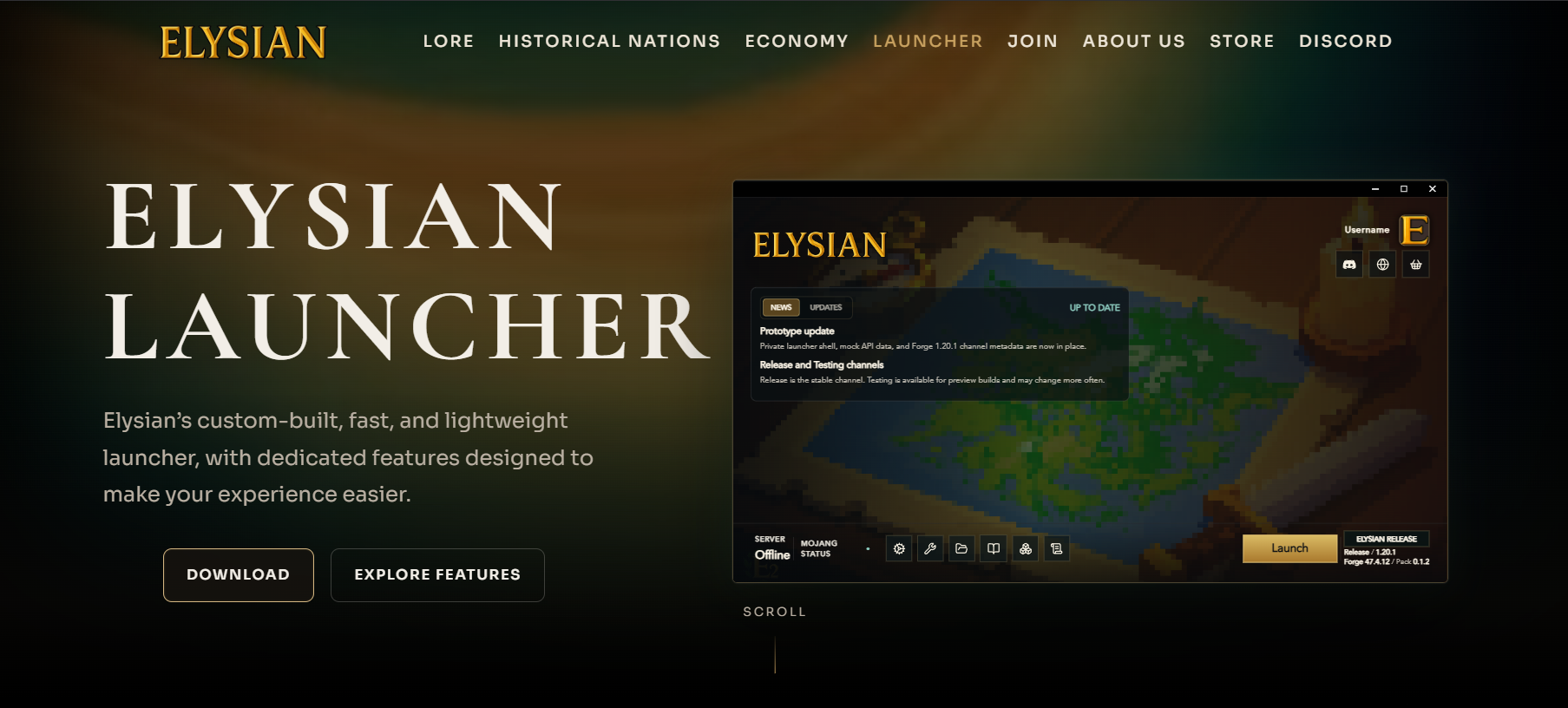
The launcher itself is a custom fork of another launcher called Helios Launcher. As they allow it, we have forked their launcher and greatly modified it to ensure it fits Elysian. This was very time efficient compared to going through the trouble of building one from scratch.
The Launcher itself uses official Microsoft Authentication and official Minecraft API. Both of which we needed to apply for and got approved.
The Launcher as of right now is fully functional, as we have completed it's initial development phase. Only legalities, such as the creation of a Terms of Use, Privacy Policy, and EULA remain for which we need to hire a professional.
The Elysian Website(s) and API
During this same period, I have made a vast collection of websites:
- The Main Elysian website: https://www.elysianmc.world/
- The Elysian Wiki website: https://wiki.elysianmc.world/
- The Elysian Info website: https://info.elysianmc.world/
- The Elysian Staff website (not public): https://console.elysianmc.world/
Among other domains such as: wings.elysianmc.world, launcher.elysianmc.world, and api.elysianmc.world.

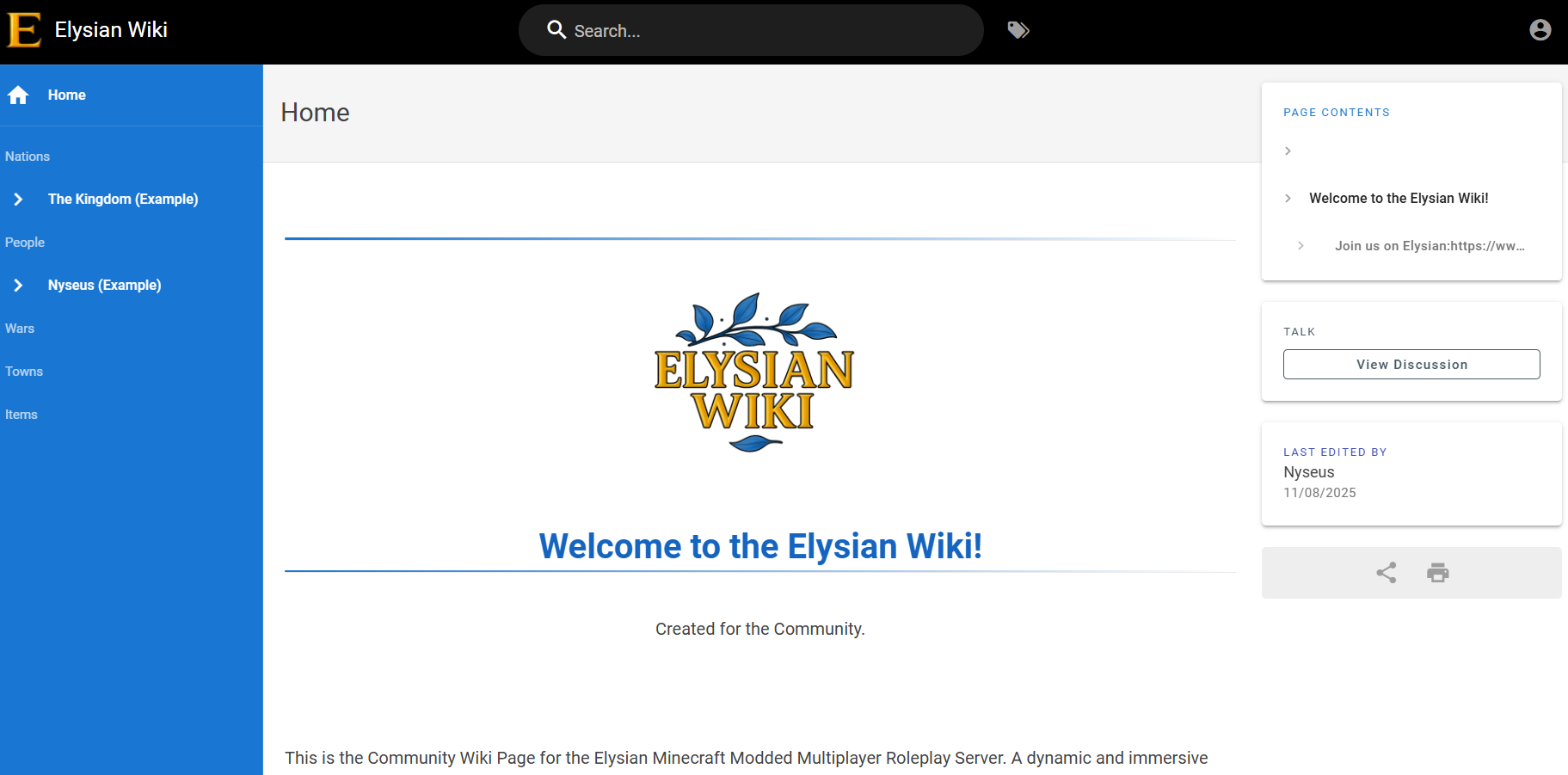
Currently, as a side project I'm also working on another website called the Underground.
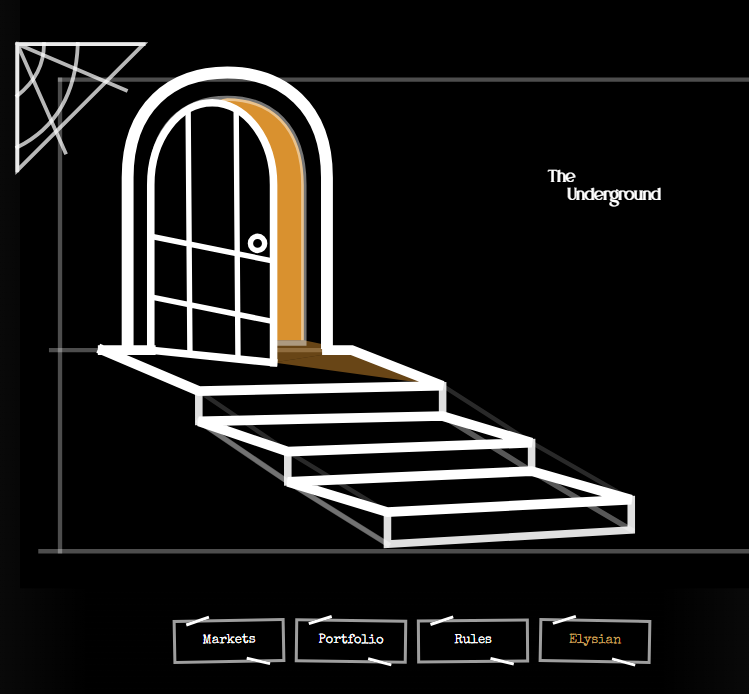
I didn't want to share many details about the Underground, but think of it as a betting website regarding events of Elysian. Kind of like Polymarket, but strictly only with in-game currency. We do not condone actual gambling. This website will be available once it's done as a hidden easter egg located at the bottom of the Main Elysian website page, and will also be reachable via: underground.elysianmc.world.
The Underground works with your Username only. You provide a Username, the website talks to the Server, if you are online on the server you will receive a 2FA code that you will need to provide in the Chat that only you can see. You can only obtain this code if you are able to login to the Server itself with your official Minecraft account. If you are not online, no code is sent. The code itself is hidden, only revealed if copy pasted from the Minecraft chat.