**Linux and macOS might require changes to the modpack.** If you use one of these **operating systems** feel free to reach out if you experience issues, especially if your modpack crashes on start/loading or if you cannot join the server. (Windows doesn't require changes) **Currently known required modifications:** **Linux:** - If you crash on modpack startup: Disable SimpleCustomEarlyLoading **macOS:** - None currently known
#### **Downloading the Modpack:** **1**. Install **Curseforge** from: [https://www.curseforge.com/download/app](https://www.curseforge.com/download/app) (If you don't have Overwolf, use the standalone download. Overwolf is not required.) Follow the steps in the Curseforge installer. **2**. Install the **Modpack** from: [https://www.curseforge.com/minecraft/modpacks/elysian-server-pack](https://www.curseforge.com/minecraft/modpacks/elysian-server-pack) Here you have two options: **1. Automatic Installation**: If using Curseforge auto-installation, click the orange install button, and the modpack will automatically begin downloading within the app. **2. Manual Installation**: \- Download the modpack file. \- Open the Curseforge app and navigate to "My Modpacks." \- Click the "Import" button. \- Select the downloaded modpack file from your downloads folder. \- When using this method. Never update any of the mods. It's very likely it will cause you issues. Never modify the modpack in any way.If you manually install the Modpack, you won't be able to do one-click updates via Curseforge. We recommend using the Automatic installation method.
**3**. Launch the Modpack: Go to "My Modpacks" within the Curseforge app. Find the Elysian Server Modpack, then hover over it and click "Play" to launch the game.Elysian, by default, only offers full support for those using Curseforge. Other platforms like Modrinth, Prism, etc. get limited or no support from us. We highly recommend using Curseforge.
If need additional support for Downloading the Modpack, or you encounter issues or Bugs always ask Staff for help.
#### **Updating the Modpack:** 1. Check `📆┃updates` for **any possible updates**. 2. Apply the Update via **Curseforge**. - Locate the Elysian Server Pack in "My Modpacks" - Your current Modpack version is displayed on the top right corner of the Modpacks Logo and check if it didnt auto-download the latest version. - If not, right click on the Modpack and select "Change Version" . - Using the dropdown select the Latest version and click Continue. **Now the Modpack will install the update and you can play again.**| [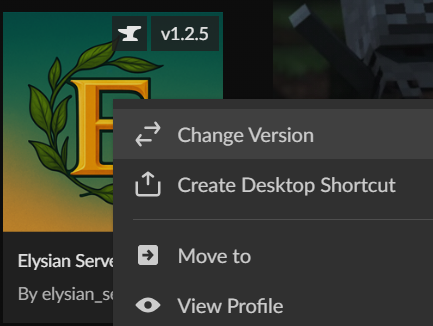](https://info.elysianmc.world/uploads/images/gallery/2025-10/switch-version.png) |
**Never Modify the Modpack. Do not add, remove, or update Mods or other assets in the Modpack without Staff approval. Uniliteral changes to the Modpack will almost always result in your Modpack becoming incompatible with the Server or violate the Server Rules.**