How to Economy (Gu, Stations, and more)
The Gold Unit (Gu)
Elysian's currency is the Gold Unit (Gu), and it runs on the gold standard. Every Gu in circulation started out as gold someone mined from the world. There are no Merchant NPCs: you earn Gu by minting it, by trading with other players, and by exporting goods to the NPC countries through Trading Stations.
Gu is the server's only currency. Your balance, Town and Nation banks, Towny taxes and upkeep, rank-ups and chest shops all run on it. Balances only hold whole Gu, and everyone starts at 0.
This guide walks through everything in order: making coins, handling your balance, setting up a Trading Station, selling abroad, trading with other Nations and the risks at sea. If you are brand new, start with Step 2 of the Getting Started guide and come back here once you are ready to trade.
If making money or doing all the hassle that comes with it isn't really your thing, we highly recommend joining existing communities where established players can help you figure it out, or just fully remove that duty from you. Economy only gets more difficult the longer you read this Doc.
Minting Gu
You turn gold into coins with a Melter. One gold ingot gives about 37 Gu in coins: an ingot holds 50 Gu of gold, but about a quarter is lost in the melting. Minting is mainly a way to get started early on, not a long-term income.
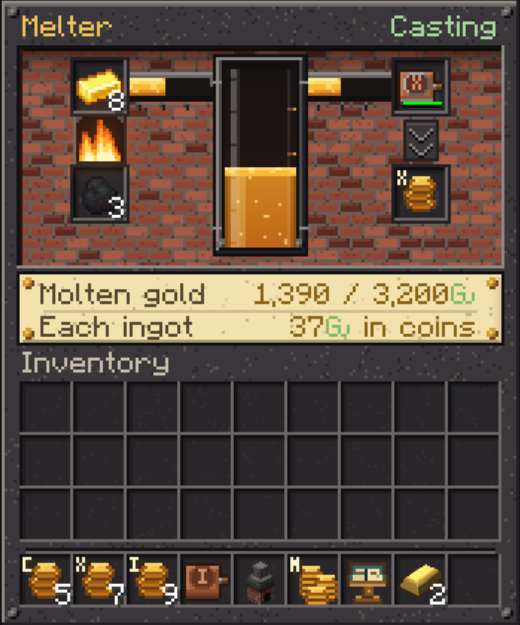
Building the Melter. The Melter is two blocks tall: a stove at the bottom and a steam vent on top, and it needs a free block above it. Craft it from an iron ingot, a cauldron and an iron ingot on the top row, a bricks block, a furnace and a bricks block in the middle, and three bricks blocks at the bottom. Open it by clicking the vent.
Using it.
- Put in gold: gold nuggets, gold ingots or blocks of gold. A nugget counts as 1/9 of an ingot and a block as 9. Raw gold has to be smelted first.
- Add fuel: coal, charcoal or coal blocks. One coal melts about 8 ingots, at 10 seconds an ingot.
- Put in a coin mould. The mould decides which coin is cast.
- Take the coins out of the output slot.
|
Mould |
Recipe |
|---|---|
|
1 Gu |
4 bricks + an iron nugget |
|
10 Gu |
4 bricks + an iron ingot |
|
100 Gu |
4 bricks + 4 iron ingots |
|
1,000 Gu |
4 bricks + 4 iron ingots + a gold ingot |
Moulds wear out as you use them, and each one is good for roughly 200 coins. A single 1,000 Gu coin needs about 27 gold ingots, and the crucible can hold up to 64 ingots at a time. You can automate the Melter with hoppers or Create. Gold goes in the top, fuel and moulds go in the sides, and finished coins drop out the bottom.
Keep in mind that molten gold is lost if the Melter is broken. You get a warning when you start breaking it.
The prices you see here (Gold to Gu conversion rate), and in this Doc in general, are our default set prices. We might modify them overtime.
Coins and your balance
Gu exists in two forms: coins in your inventory and the balance in your account. Coins come in 1, 10, 100 and 1,000 Gu, and ten 1,000 Gu coins make a Pure Gold Bar worth 10,000 Gu. Coins are physical items: whoever holds them owns them, so they can be dropped, lost or stolen like anything else.
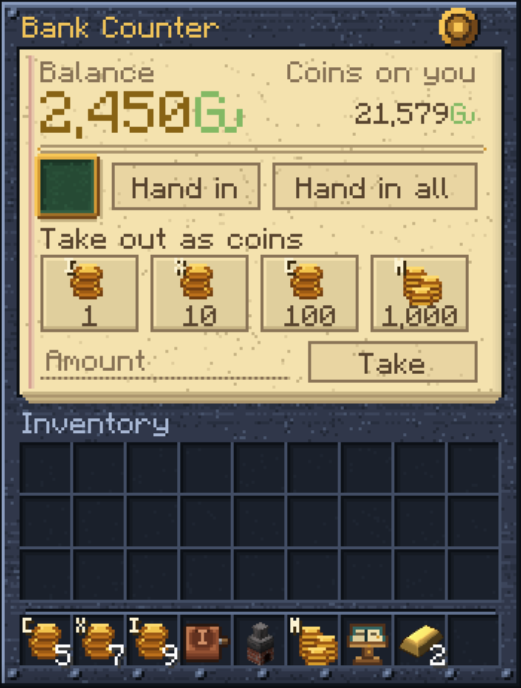
Changing coins. A 10 Gu coin crafts into ten 1s, and a 100 Gu coin into ten 10s. Ten 1,000 Gu coins in one crafting slot make a bar, and a bar crafts back into ten 1,000s. A 1,000 Gu coin doesn't split by crafting: hand it in at a bank counter and take out smaller coins.
The bank counter. Sneak + right-click a Safe with an empty hand or with coins in hand. A plain right-click opens the Safe's own storage instead.
- Hand in the coins on the dish, or press "Hand in all" to deposit every coin you carry.
- Take out coins with the 1, 10, 100 and 1,000 Gu buttons, or type any amount up to 100,000 Gu. Amounts of 10,000 Gu or more are paid partly in Pure Gold Bars.
Safes can be locked with a key, but other players can lockpick them. Lockpicking a Safe only touches what is stored inside it.
Trading Station(s)
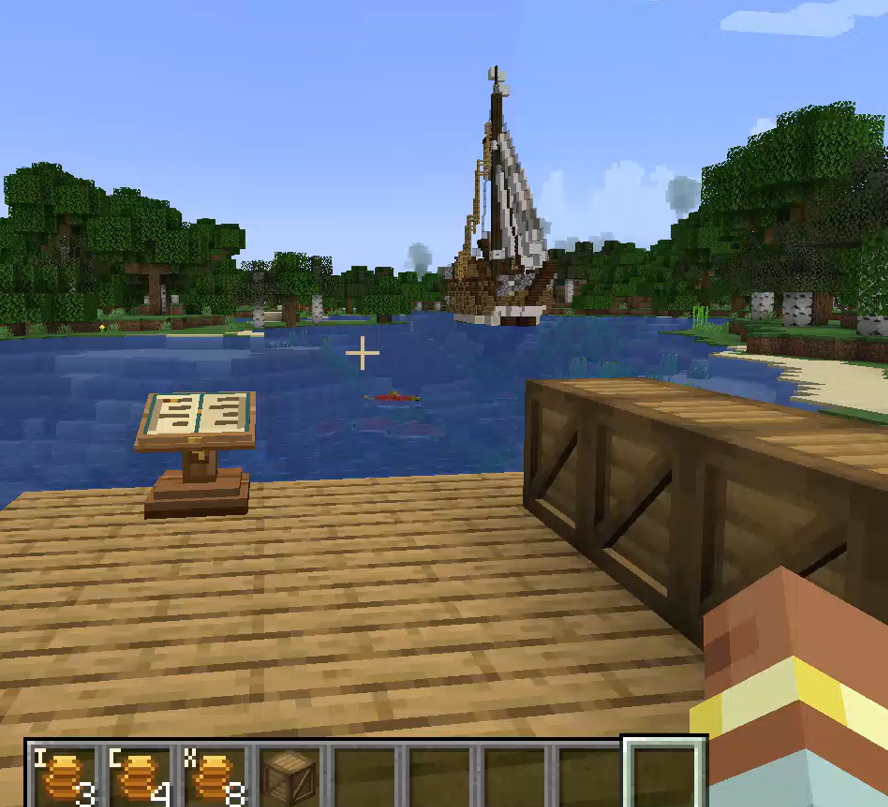
All trading with the NPC countries and between Nations goes through a Trading Station. A station is a block with its own Gu account, a berth on the water for its ship, and cargo crates for its goods.
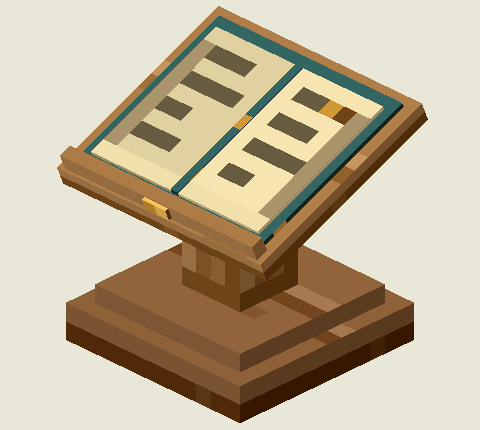
The Trading Station block.
Crafting one. A book, a 1,000 Gu coin and a book on the top row, and six planks of any wood below. The coin is used up.
How many you can have. A Town may have 1 station, 2 from 5 residents, 3 from 10 and 4 from 15. A station counts for the Town whose claim it stands in, or for its owner's Town if it stands in the wilderness. A player without a Town may have one station. A Town that shrinks keeps its stations but can't open new ones.
Setting up
- Place the station. It belongs to you.
- Open its book, go to the Station pages (the purple ribbon) and press Place berth. An outline of the berth appears on the water: green where it fits, red where it doesn't, with the dock line in gold. Right-click pins it and right-click again sets it. R turns it, the arrow keys move it, left-click unpins it and X stops placing.
- Place cargo crates (Refurbished Furniture crates, any wood) within 16 blocks of the station. They link on their own. Link crates picks up crates placed earlier.
- Fill the crates with the goods you want to sell. Hoppers and Create work as usual. Only regular items count, so nothing renamed, enchanted or damaged.
How to set a Berth? Open water within 64 blocks of the station, at least as long, wide and deep as your ship (see the table below), with 16 blocks of clear air above. Along one long side it needs a straight dock line of 30 dock blocks: planks, wooden slabs or stairs, logs, stone bricks, cobblestone, smooth stone, bricks, mud bricks, deepslate bricks or polished andesite. Kelp, seagrass, lily pads and coral count as open water. The berth also needs a sea route to the edge of the map, at least 3 blocks deep; ships can sail up rivers.
|
Level |
Ship |
Berth (length x width, depth) |
|---|---|---|
|
1 |
Sloop |
30 x 9, 5 deep |
|
2 |
Pinnace |
32 x 9, 5 deep |
|
3 |
Brigantine |
34 x 11, 6 deep |
|
4 |
Fluyt |
43 x 11, 7 deep |
|
5 |
Galleon |
43 x 13, 7 deep |
|
6 |
East Indiaman |
56 x 17, 8 deep |
Check berth re-checks the berth and the route, and tells you where a route is blocked. If a new spot fails, your old berth stays.
Who runs it. The owner, players the owner adds, and the mayor of the Town it stands in. Any of them can book trades, post orders and move Gu. Only the owner, the mayor or Staff can rename the station or change who runs it. Be very careful who you give your Trading Station access to.
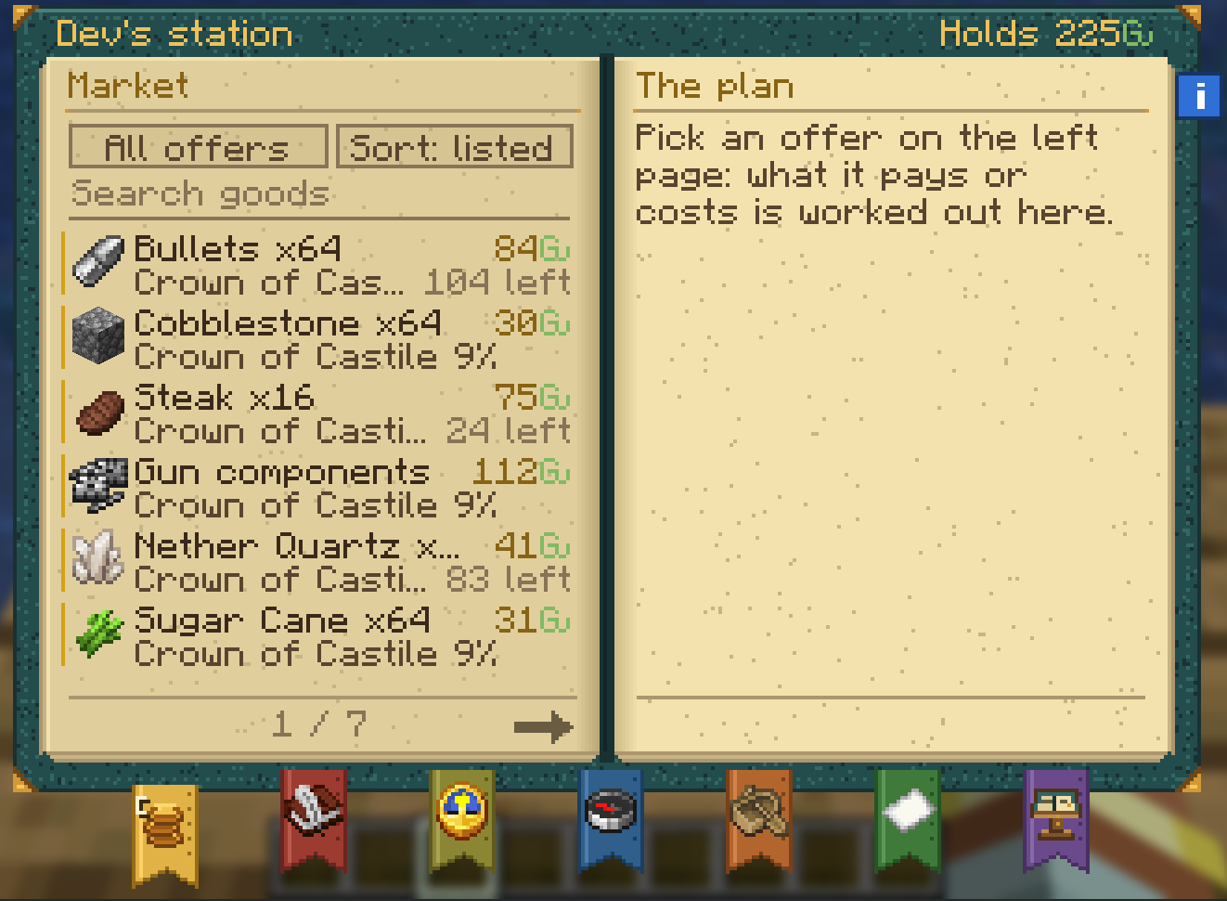
The station book has seven ribbons:
- Market: offers from the countries and other stations, and the sums for your trade.
- Orders: post your own buy orders and sell offers.
- Prices: a chart for every good over 7, 30 or 90 days.
- Voyages: ships under way and those of the last 30 days.
- Fleet: your ship and all six levels.
- News: everything that happened at the station. A red seal marks unread news.
- Station: name, berth, route, crates, the Treasury, who runs it and the next sailing.
The first station you open offers a short tour. The blue "i" on the book's edge replays it. We highly recommend going through the in-game tour as well.
The Treasury. Sales are paid into the station's account, not yours. On the Station pages, take Gu out to your balance or as coins, or put Gu in from your balance or as coins. Every movement shows in the station's News.
Breaking a station is allowed. Bookings that haven't loaded go back to the crates, its orders close and its Gu drops as coins. The station you pick up keeps its name, level and progress, but not its berth, crates or operators. A ship that has already loaded still sails, and its pay goes to the owner.
Selling to the NPC countries
Six foreign countries buy goods from Elysian. They only buy, never sell. Every station sees the same offers on its Market pages.
|
Country |
Import tax |
Always buys |
Also asks for, from time to time |
|---|---|---|---|
|
Crown of Castile |
9% |
cobblestone, sugar cane |
diamonds, amethyst, quartz, cooked beef, honey |
|
Dutch Republic |
4% |
bricks, glass |
logs, cod, salmon, sugar cane, ink sacs |
|
Kingdom of England |
8% |
wool, pumpkins |
diamonds, emeralds, redstone blocks, sugar, paper |
|
Ottoman Empire |
7% |
cobblestone, wheat |
iron blocks, copper blocks, wool, glass, sugar |
|
Kingdom of Portugal |
6% |
logs, potatoes |
wheat, cod, iron blocks, gunpowder, string |
|
Republic of Venice |
5% |
stone bricks, paper |
books, paper, lapis blocks, leather, salmon |
The "always buys" offers never run out but pay less than full price. The others are drawn every week, last up to 7 days and pay more. Goods from other mods sell too: wine (older wine is worth more, and aged 5+ and 15+ years have their own offers), dried tea, coffee beans, cotton, medicine, tropical fruit, blackpowder, bullets and firearms.
We frequently update what you are able to sell, and we sometimes intervene in prices as staff. It's rare, but letting you know just in case.
Booking a sale
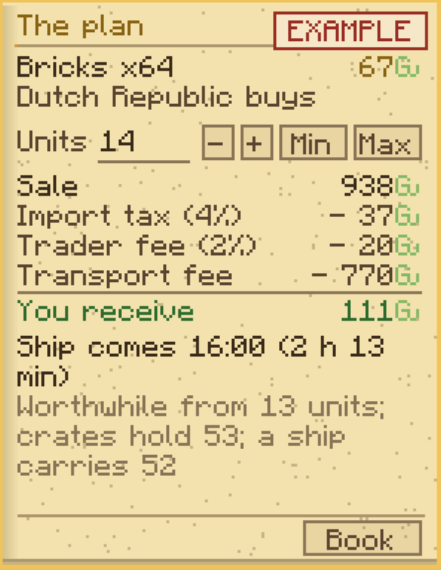
- Pick an offer on the Market pages and set how many units to sell. The plan on the right shows what you'll get after every fee and tax, and "Worthwhile from N units" tells you the smallest sale that still earns something.
- Press Book. The goods leave your crates straight away and wait for the ship.
- The ship comes at the next sailing, loads at your dock and sails off to the edge of the map.
- You are paid into the station's account once the ship reaches the edge of the map.
Sailings. Ships sail twice a day, at 16:00 and 21:00 UTC. Bookings close 5 minutes before each sailing. Until then you can cancel and the goods go back to the crates. Several bookings can share one ship as long as it has room. When it's full, nothing more can be booked until it sails.
The voyage ship sails in from the edge of the map and loads up, which takes 30 seconds plus 2 seconds for every stack on board. A full Sloop takes about 2 minutes. Once it's loaded, it heads back out the way it came. If something blocks its path, it turns around, unloads everything back into your crates, and the sale is called off.
What a sale costs. From the price, the following are taken off:
- the country's import tax (see the table above);
- your Nation's export tax, if it has one;
- the trader's fee, which falls as your station levels up (see Ships and risks at sea);
- the transport fee, which depends on your ship: from 770 Gu for a Sloop to 7,880 Gu for an East Indiaman. Several sales on one ship share it by the stacks each takes.
The transport fee is why small sales don't pay. Fill your ship.
Prices
NPC prices react to supply and demand, so no price is fixed. If lots of people sell the same good, its price drops, and it takes a while to climb back. Consider this when deciding what to produce.
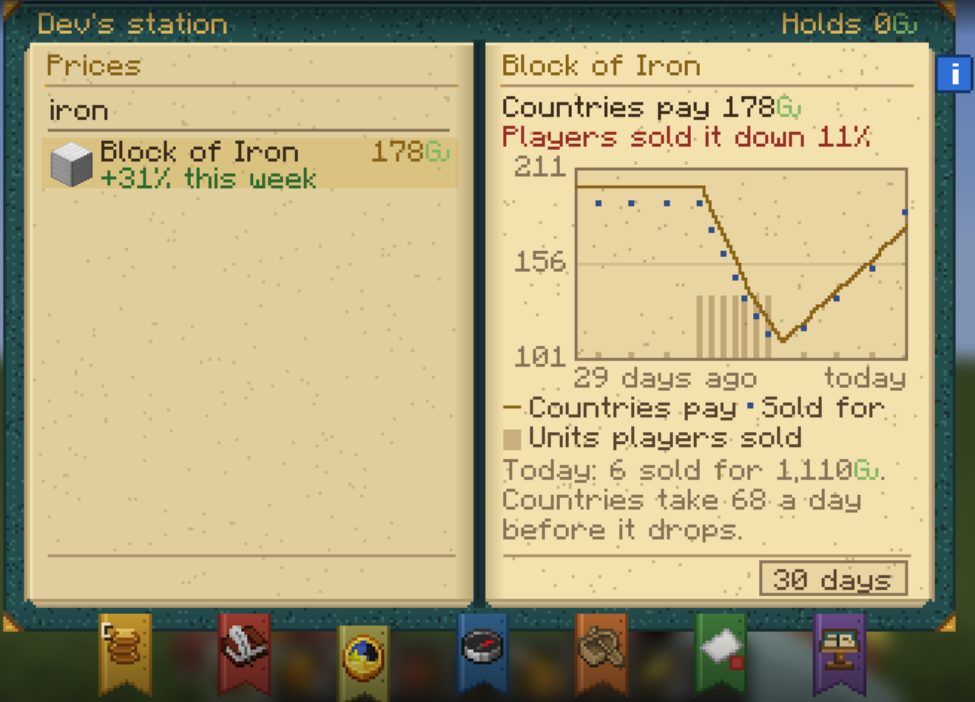
- Daily: each day the countries take a limited amount of every good (about 5,000 Gu worth) at full price. Sell more than that and the price drops the next day, by up to 8% a day. Each day it sells within the limit, it climbs back 3%. A price never falls below 30% of its full value from overselling alone.
- Weekly: a good's price also moves up to 20% either way, depending on how much of last week's offers for it were taken.
- Sales between players count towards the daily totals too.
- Once you've booked a sale, its price is locked in. Open offers follow the price as it changes.
The Prices pages of every station book show each good's price over the last 7, 30 or 90 days. Check them before you commit to a product: they show what's selling, and what everyone else has been dumping.
Trading between Nations
Stations can trade with each other directly, and the goods sail from dock to dock. Any station can post an order on its Orders pages, and any other station can fill it from the Market pages (filter by "Elysian").
- Buy order: you name a good, how many units and your price per unit. The station's Gu for it is held from the moment you post.
- Sell offer: you name your price. The goods are taken from your crates and held from the moment you post.
Orders can be for any plain item, not only market goods; for those, one unit is one stack. An order stays open for 1 to 365 days (7 by default), and a station can have up to 50 open at once. Cancelling, or letting it run out, returns whatever is still held. A station needs a working berth and sea route to post orders.
Who pays what
- Whoever fills the order pays the transport fee: the seller when filling a buy order, the buyer when taking a sell offer. It's 100 Gu plus 5 Gu per 100 blocks of sea route between the two docks, at most 1,000 Gu.
- The seller pays the trader's fee, at the seller's station level.
- The seller's Nation takes its export tax, and the buyer pays its own Nation's import tax on top. Two stations of the same Nation pay neither.
- Fees and taxes are fixed when the trade is booked.
The voyage. The booking station's ship sails in from the edge of the map to the seller's dock, loads, sails to the buyer's dock, unloads into the buyer's crates and leaves. If it's too big for the other station's berth, the largest ship that fits sails instead.
When a ship is sunk, the loss is shared. The buyer's Gu is held from booking. When the goods are loaded, the fees, the taxes and half the seller's pay go out. The other half is paid when the ship reaches the buyer.
|
Ship sunk |
What happens |
|---|---|
|
Before loading |
The trade is off. Both get everything back. |
|
While loading |
The seller loses the goods. The buyer gets their Gu back. |
|
At sea with the goods aboard |
The seller keeps the half already paid. The buyer gets the other half back and loses the goods. 0 to 40% floats up as salvage. |
|
At the buyer's dock |
The buyer loses the goods. The seller is paid in full. |
|
Leaving empty |
Nothing is lost. |
So sinking your own trade doesn't pay: on any trade worth the trip, whichever side you are on loses more than the salvage is worth on average.
Ships and risks at sea
Your station's level decides which ship it sends. Higher levels get bigger ships that carry more, and a lower trader's fee.
|
Level |
Ship |
Hold (stacks) |
To reach it |
Transport fee |
Trader's fee |
Hull |
|---|---|---|---|---|---|---|
|
1 |
Sloop |
52 |
from the start |
770 Gu |
2.0% |
300 |
|
2 |
Pinnace |
116 |
5 trades, 10,000 Gu traded |
1,410 Gu |
1.7% |
620 |
|
3 |
Brigantine |
134 |
12 trades, 40,000 Gu |
1,590 Gu |
1.4% |
710 |
|
4 |
Fluyt |
244 |
25 trades, 125,000 Gu |
2,690 Gu |
1.1% |
1,260 |
|
5 |
Galleon |
359 |
45 trades, 300,000 Gu |
3,840 Gu |
0.8% |
1,835 |
|
6 |
East Indiaman |
763 |
75 trades, 700,000 Gu |
7,880 Gu |
0.5% |
3,855 |
Levelling up. A sale abroad counts once it's paid, and a trade between stations counts for both once the goods arrive. A ship carrying several sales counts as one trade. Trades between stations with the same owner don't count. Raising the level is free: press it on the Fleet pages once your berth fits the next ship.
Attacks. Your goods don't teleport. Every ship can be attacked the whole way, except inside its own station's Town claims. Cannon shot and explosions do full damage, machine guns a quarter, arrows little, swords almost nothing and fire nothing. Ships from Create Aeronautics can ram a trader ship: the heavier and faster, the more damage. The station's operators get a warning when their ship is under attack.
Sinking. A ship sunk on its way in sinks the trade, not the goods: they stay in your crates. A ship sunk after loading takes its cargo down with it. 0 to 40% of it floats up in salvage crates that anyone can open, for 10 minutes. Whoever gets there first keeps it.
Pirates. Pirates lurk at the edge of the map. A ship carrying a sale abroad has a 5% chance of being taken as it leaves. Part of the cargo (0 to 40%) is recovered and returned with your station's next ship. Ships trading between stations leave empty, so pirates don't bother them.
Who sees your ships. On the world map and minimap, the station's owner and operators see their ships in gold. Residents of its Town, its Nation and allied Nations see them in blue. Everyone else has to spot them. Right-clicking a ship shows its station and hull, never its cargo.
Seeing ships far away. Ships show as far as your game draws the world (with Voxy, its full distance). You can limit this under Mods, Elysian Trading, Config.
Taxes
Every Nation's leader sets the Nation's own export and import taxes, and the money goes straight into the Nation's bank. Whether your Nation becomes a low-tax trade hub or squeezes every Gu out of its neighbours is a political decision.
- Export tax: taken from the seller's pay on every sale leaving the Nation, including sales to the NPC countries.
- Import tax: paid on top of the price by a station buying from another Nation.
- Same Nation: trades between two stations of the same Nation pay neither.
- Rates can be anything from 0 to 100%. A trade keeps the rates from when it was booked, and a buy order keeps the import rate from when it was posted.
Leaders set the rates in game:
- /tradetax shows your Nation's rates.
- /tradetax export <percent> sets the export tax.
- /tradetax import <percent> sets the import tax.
The NPC countries have import taxes of their own, from 4% to 9%, taken from every sale to them (see Selling to the NPC countries).
Secure player trades
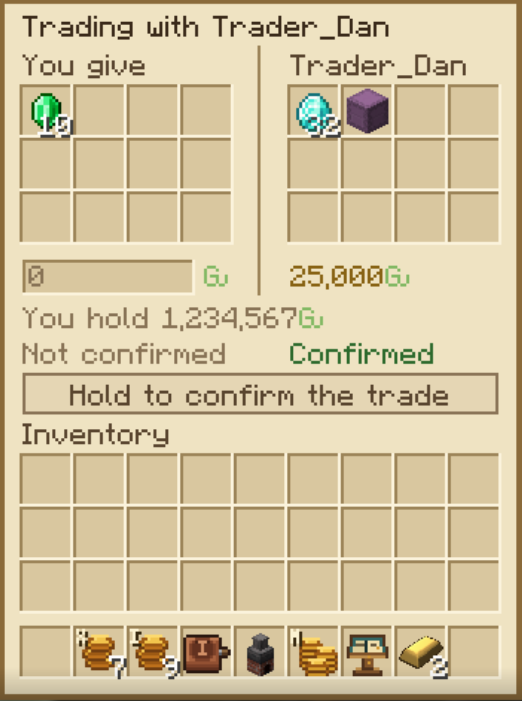
For trades face to face, use /trade. It opens a trade window that both sides must confirm, so no more "drop it on the ground and trust me".
- Stand within 5 blocks of the other player and type /trade <player>.
- They accept within 60 seconds by clicking [Trade] in chat or typing /trade confirm <player>.
- Each side puts up to 12 items in the window, and can add Gu from their balance.
- Both press and hold Confirm for 3 seconds. Any change resets both confirmations, and a change must stand for 3 seconds before anyone can confirm.
The trade is cancelled, and everything goes back to its owner, if either player walks more than 5 blocks away, changes dimension, dies, logs out or closes the window. It's refused if either side doesn't have room for what they'd receive.
Achievements
Trading earns achievements in the Trade and Commerce tab of the Achievements screen. Unlike most achievements, these are granted automatically by the server, so no ticket is needed. If you're offline when you earn one, you get it at your next login.
|
Achievement |
How to earn it |
Reward |
|---|---|---|
|
Struck Gold |
Take your first coins out of a Melter. |
500 Gu |
|
Shake on It |
Complete a secure /trade with another player. |
500 Gu |
|
Open for Business |
Own a station with a working berth. |
1,250 Gu |
|
Maiden Voyage |
Get paid for a sale to a foreign country. |
1,250 Gu |
|
Partners in Trade |
Deliver goods between your station and another Nation's. |
2,500 Gu |
|
Fine Vintage |
Sell wine aged fifteen years abroad. |
2,500 Gu |
|
Weathered the Storm |
Bring a damaged ship to the end of its voyage. |
2,500 Gu |
|
Known in Every Court |
Sell to all six countries. |
5,000 Gu |
|
Tolls and Tariffs |
As a Nation's leader, collect 10,000 Gu in trade taxes. |
5,000 Gu |
|
The East Elysian Company |
Raise a station to level 6. |
12,500 Gu |
One more sits in the Conflict and Combat tab: Letter of Marque (2,500 Gu), for being part of sinking a foreign Nation's trader ship, by damaging it or being within 64 blocks when it goes down.
Commands
|
Command |
What it does |
|---|---|
|
/gu |
Your balance and the list of commands. |
|
/gu balance |
Your balance. |
|
/gu top |
The richest players, Towns, Nations and stations. |
|
/trade <player> |
Asks a nearby player for a secure trade. |
|
/trade confirm <player> |
Accepts a trade request. |
|
/tradetax |
Shows your Nation's trade taxes. |
|
/tradetax export <percent> |
Sets your Nation's export tax (leaders only). |
|
/tradetax import <percent> |
Sets your Nation's import tax (leaders only). |
If something is unclear, or you think something isn't working as described, contact Staff on our Discord server.