# Wiki Editing

How to become and Edit the Pages of the Elysian Roleplay Wiki.

# Becoming a Wiki Editor.

<div id="bkmrk-in-order-to-avoid-gr">  
In order to avoid griefing and improper management of the Wiki and its Pages, only **approved** Players may become Wiki Editors.  
  
Wiki Editors have ranks; as you get more trusted, you will be able to manage more and more of the Wiki. (Jr. Wiki Editor, Wiki Editor, and Sr. Wiki Editor.)  
  
You can apply to become a Wiki Editor once you have **surpassed 30 in-game Gameplay hours on the Server.** (Can be checked via: `/playtime`)  
  
Once you are ready, apply by opening a **Support Ticket** on the **Discord** with your IGN and your interest in becoming a Wiki Editor.</div><p class="callout warning">Low-trust players may be dismissed even if they meet the 30-hour playtime requirement. This is fully up to Staff.  
</p>

#### Rules of Being a Wiki Editor:  


1. Do not randomly delete Pages, or make edits to them that makes them unreadable.
2. Stick to the theme, only cover topics that effect Roleplay on the Server.
3. Only finalize high-quality and accurate Pages.
4. Do not blatantly lie or make up information. (Get a source.)
5. Do not Troll or make "joke" pages. Remain serious, do not break/ruin the Roleplay.
6. Do not make biased pages, avoid biased language, always focus on sounding as neutral as possible. Your job is to describe, not inform or convince.
7. Do not involve real life politics in any way. It's preferred that comparing, or referring to real world situations is fully avoided.
8. Do not edit pages that don't need any changes or are off limits to you. (Especially the Home Page.)

Ignoring or breaking these rules would result in your Wiki Editor rights being revoked and depending on the severity you may also be fully banned from the server.

**Only apply to become a Wiki Editor if you are passionate about documenting history.**

#### Reporting incorrect information:

If as a regular Wiki reader you come across information that is not true, please either (in this order):

- Contact the person who last edited the Page.
- Leave a comment on the page **politely** pointing out the issue.
- Open a Support Ticket on our Discord.

<p class="callout danger">Do not argue about differences in opinion, unless you have proof that some information is incorrect, do not try correcting it.  
  
Wiki Editors have dedicated Discord channels for discussing each page. If you wish to discuss opinion based differences, consider becoming a Wiki Editor.</p>

# Editing the Wiki

<div id="bkmrk-once-you-have-been-a">**Once you have been approved to become a Wiki Editor, these are the steps you should follow:**   
</div>1\. **Log in to your Wiki Account.**   
After you have been approved, Staff will provide you with login details for your **Wiki Account.** This will likely require that you provide an email address you would like to use. [https://wiki.elysianmc.world/login](https://wiki.elysianmc.world/login)

<div id="bkmrk-">  
</div><div id="bkmrk-2.-understanding-the">2. **Understanding the Wiki and your Limits.** As a Jr. Wiki Editor, on top of default permissions you will be able to:</div><div id="bkmrk-write-pages-manage-p">- Write Pages
- Manage Pages
- Read Source Code (Advanced)
- Read Editing History
- Read Assets (Use uploaded Assets)
- Write Assets (Upload Assets)

</div>**Keep in mind, regardless of your Editor Rank, the Owner will always be able to see all the edits you made and is able to reverse them.**

You can edit an existing Page easily by clicking the Blue "Pen" button at the bottom right corner. You can make a New Page by clicking the "New Page" button on the top right:

<table border="1" id="bkmrk-editing-an-existing-" style="border-collapse: collapse; width: 100%;"><colgroup><col style="width: 50%;"></col><col style="width: 50%;"></col></colgroup><tbody><tr><td>Editing an Existing Page.

</td><td>Making a New Page.

</td></tr><tr><td>[![image.png](https://info.elysianmc.world/uploads/images/gallery/2025-10/scaled-1680-/z5zimage.png)](https://info.elysianmc.world/uploads/images/gallery/2025-10/z5zimage.png)

</td><td>[![image.png](https://info.elysianmc.world/uploads/images/gallery/2025-10/scaled-1680-/Xwdimage.png)](https://info.elysianmc.world/uploads/images/gallery/2025-10/Xwdimage.png)

</td></tr></tbody></table>

3\. **Making/Editing a Page.**

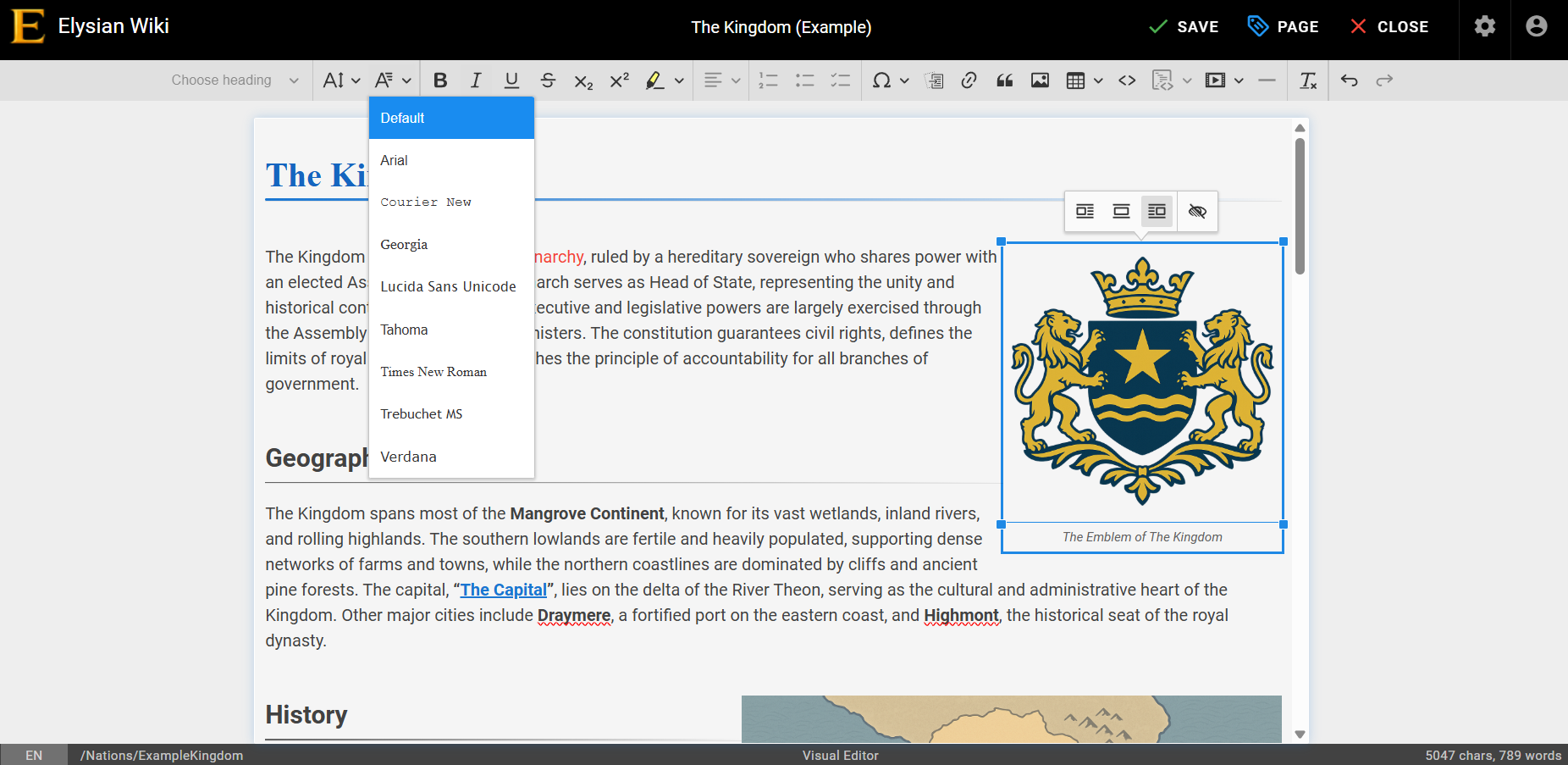
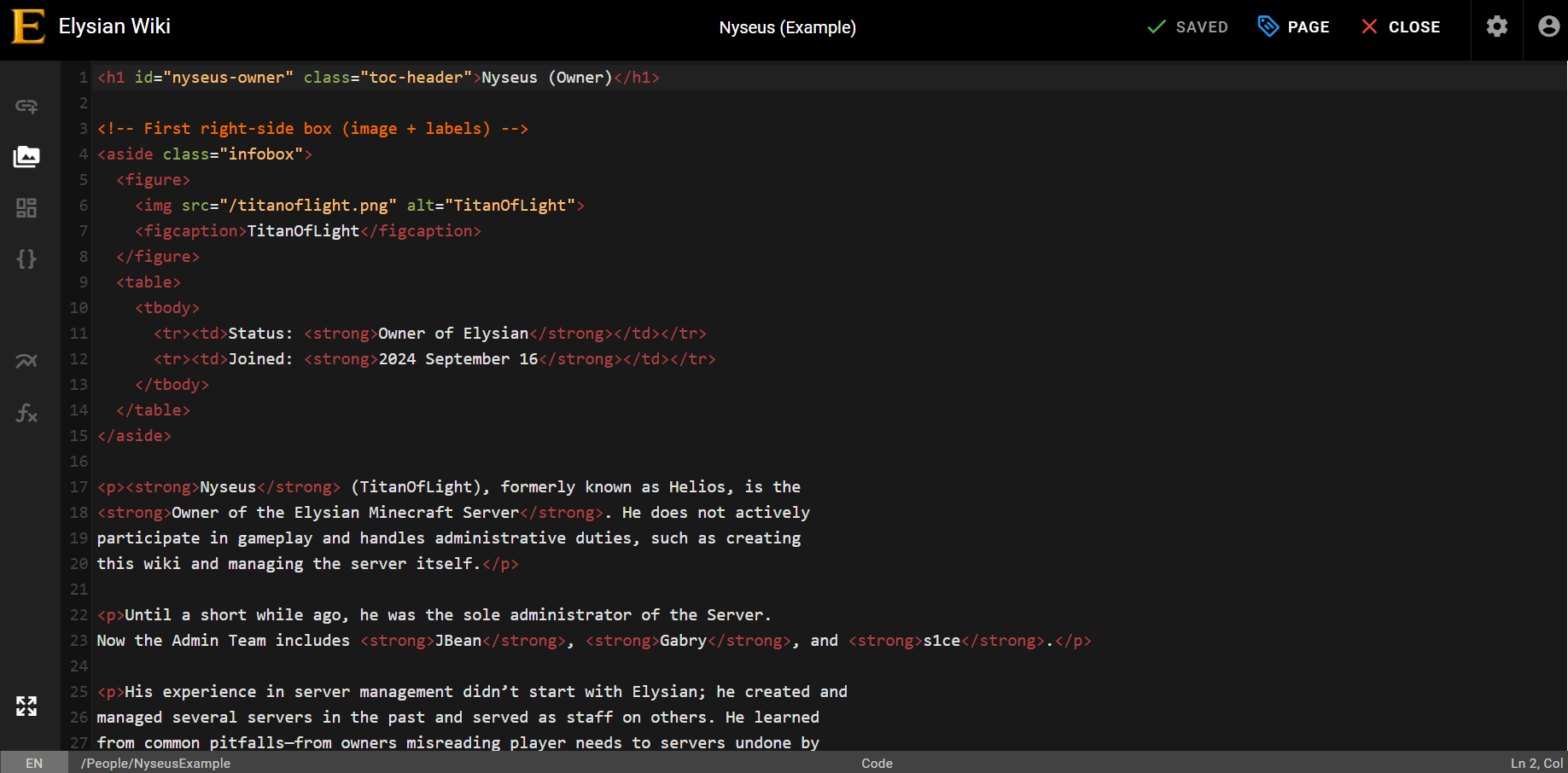
Depending on what Style you are going for, typically editing is done via the **Visual Editor.** The VE is like making a Google Doc or using Adobe. It is simple and very straightforward, however, it is relatively limited in terms of what it can do. For highly detailed and custom pages we use **HTML/CSS Code Editing**. Both HTML and CSS are complex coding languages and are only recommended for those with experience (HTML is much easier compared to CSS). With AI you may be able to do some changes, but overall if you are not familiar with them, the regular Visual Editor meets Wiki Standards perfectly fine.

<table border="1" class="align-center" id="bkmrk-example-of-using-the" style="border-collapse: collapse; width: 110.357%; height: 293px;"><colgroup><col style="width: 50.0477%;"></col><col style="width: 50.0477%;"></col></colgroup><tbody><tr><td class="align-center">Example of using the Visual Editor:</td><td>Example of a Page made via HTML:</td></tr><tr><td>[![image.png](https://info.elysianmc.world/uploads/images/gallery/2025-10/scaled-1680-/VW9image.png)](https://info.elysianmc.world/uploads/images/gallery/2025-10/VW9image.png)

</td><td>[![image.png](https://info.elysianmc.world/uploads/images/gallery/2025-10/scaled-1680-/LHgimage.png)](https://info.elysianmc.world/uploads/images/gallery/2025-10/LHgimage.png)

</td></tr></tbody></table>

You can change your editorial preferences to always use either the Visual or the Text based (coding) editor in your Profile Settings.   
  
For beginners, it is obviously recommended to use the Visual Editor.  
  
Most Pages Save automatically. But to be safe you can always force a save by clicking the green "Save" button at the top right corner.  
  
4\. **Making New Pages.**  
  
Making new pages are slightly more difficult compared to editing them.  
  
Making new pages requires Staff permission. Sr. Wiki Editors will do the initial setup process for you so you only need to edit the page.  
  
To request a new page, you can do so in the Wiki Editor Talk channel on the Discord.  
  
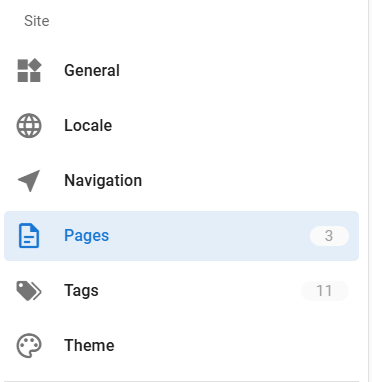
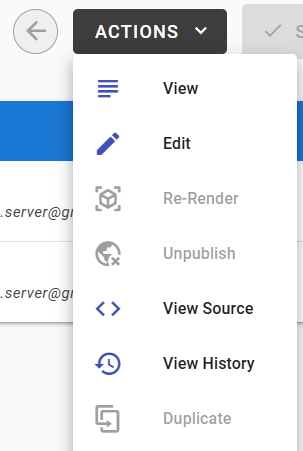
Once your request is approved, you can find the page you need to edit by going into the Administrator Area (Cogwheel icon in the top right), finding the "Pages" menu option and finding the page you requested. To edit this new page, click on "Actions" in the top right corner and select "Edit".

<table border="1" id="bkmrk-%22pages%22-menu-point%3A-" style="border-collapse: collapse; width: 100%;"><colgroup><col style="width: 50%;"></col><col style="width: 50%;"></col></colgroup><tbody><tr><td class="align-center">"Pages" menu point:</td><td class="align-center">The "Edit" button within "Actions":</td></tr><tr><td>[![image.png](https://info.elysianmc.world/uploads/images/gallery/2025-10/scaled-1680-/ljrimage.png)](https://info.elysianmc.world/uploads/images/gallery/2025-10/ljrimage.png)

</td><td>[![image.png](https://info.elysianmc.world/uploads/images/gallery/2025-10/scaled-1680-/NBlimage.png)](https://info.elysianmc.world/uploads/images/gallery/2025-10/NBlimage.png)

</td></tr></tbody></table>

Once you are done editing a new Page, just save it and let a Sr. Wiki Editor know that you have finished editing a new page. They will review it and publish it.

<p class="callout success">If you have any questions feel free to let Staff or any Sr. Wiki Editor know. We are happy to help.  
</p>

<div id="bkmrk--2"></div>